# CNN \[Convolutional Neural Networks]
A convolutional neural network, also known as a CNN or ConvNet, is an artificial neural network that has so far been most popularly used for analyzing images for computer vision tasks. And just like any other layer, a convolutional layer receives input, transforms the input in some way, and then outputs the transformed input to the next layer. With a convolutional layer, the transformation that occurs is called a convolution operation.
With each convolutional layer, we need to specify the number of filters the layer should have. These filters are actually what detect the patterns. Patterns such as -- edges, shapes, textures, curves, objects, colors.
Convolution can mathematically be understood as the combined integration of two different functions to find out how the influence of the different function or modify one another.
CNNs utilize kernels or filters to detect the different features that are present in any image. Kernels are just a matrix of distinct values (known as weights in the world of Artificial Neural Networks) trained to detect specific features. The filter moves over the entire image to check if the presence of any feature is detected or not. The filter carries out the convolution operation to provide a final value that represents how confident it is that a particular feature is present.
One type of pattern that a filter can detect in an image is edges, so this filter would be called an edge detector. Aside from edges, some filters may detect corners. Some may detect circles. Others, squares. Now these simple, and kind of geometric, filters are what we'd see at the start of a convolutional neural network. The deeper the network goes, the more sophisticated the filters become. In later layers, rather than edges and simple shapes, our filters may be able to detect specific objects like eyes, ears, hair or fur, feathers, scales, and beaks.
In even deeper layers, the filters are able to detect even more sophisticated objects like full dogs, cats, lizards, and birds.
Before diving into the CNN and it's nuance let's understand IMAGE first :-
Pixels are atomic elements of a digital image, it’s the smallest element of an image represented on the screen. A pixel can have values ranging from 0 to 255, where 0 is black and 255 is white. Images can have different channels, such as RGB, BGR here R- red, G-green, and B- blue and Grayscale images have just one channel.
* Image format – GIF, JPEG, PNG, RAW, TIF, PGM, PBM, and medical images – DICOM, Analyze, NIFTI etc.
* Image Transformation – filtering (sharping, blurring, scaling etc.)
* Affine Transformation – basic image transformation like scale, translate, mirror, reflection, identity.
Feature Extraction from Images: --
* SIFT (Scale-invariant Feature transform)
* HOG (Histogram of Oriented Gradients)
* Convolution and Kernels
* Convolution and correlation
**In computer vision there are 4 types of tasks:**
1. Classification
2. Classification + Localization
3. Object Detection
4. Segmentation (Semantic, Instance)
***
### **The Convolution Operation**
The fundamental difference between a densely connected layer and a convolution layer is this:
Dense layers learn global patterns in their input feature space (for example, for a MNIST digit, patterns involving all pixels), whereas convolution layers learn local patterns (see below figure): in the case of images, patterns found in small 2D windows of the inputs. In the example **\[code 1]**, these windows are all 3 × 3.

This key characteristic gives convnets two interesting properties:
1. **The patterns they learn are translation invariant :** After learning a certain pattern in the lower-right corner of a picture, a convnet can recognize it anywhere: for example, in the upper-left corner. This makes convnets data efficient when processing images, they need fewer training samples to learn representations that have generalization power.
2. **They can learn spatial hierarchies of patterns** : A first convolution layer will learn small local patterns such as edges, a second convolution layer will learn larger patterns made of the features of the first layers, and so on. This allows convnets to efficiently learn increasingly complex and abstract visual concepts. For better understanding look at following figure-

Convolutions operate over 3D tensors, called **feature map**s, with two spatial axes (height and width) as well as a *depth axis* (also called the *channels axis*).
For an RGB image, the dimension of the depth axis is 3, because the image has three color channels: red, green, and blue. For a black-and-white picture, like the MNIST digits, the depth is 1 (levels of gray). The convolution operation extracts patches from its input feature map and applies the same transformation to all of these patches, producing an output feature map. This output feature map is still a 3D tensor.
In the MNIST example, the first convolution layer takes a feature map of size (28, 28, 1) and outputs a feature map of size (26, 26, 32): it computes 32 filters over its input. Each of these 32 output channels contains a 26 × 26 grid of values, which is a response map of the filter over the input, indicating the response of that filter pattern at different locations in the input (see below figure). That is what the term feature map means: every dimension in the depth axis is a feature (or filter), and the 2D tensor output\[:, :, n] is the 2D spatial map of the response of this filter over the input.

Convolutions are defined by two key parameters:
* Size of the patches extracted from the inputs—These are typically 3 × 3 /5 × 5
* Depth of the output feature map—The number of filters computed by the convolution.
{% hint style="info" %}
In Keras Conv2D layers, these parameters are the first arguments passed to the layer:`Conv2D(output_depth, (window_height, window_width)).`
{% endhint %}
A convolution works by sliding these windows of size 3 × 3 or 5 × 5 over the 3D input feature map, stopping at every possible location, and extracting the 3D patch of surrounding features (shape (window\_height, window\_width, input\_depth)).
Each such 3D patch is then transformed (via a tensor product with the same learned weight matrix, called the convolution kernel) into a 1D vector of shape (output\_depth,)
```python
# code 1
# CNN model to classify MNIST digits in keras
from keras import layers
from keras import models
model = models.Sequential()
model.add(layers.Conv2D(32, (3, 3), activation='relu', input_shape=(28, 28, 1)))
model.add(layers.MaxPooling2D((2, 2)))
model.add(layers.Conv2D(64, (3, 3), activation='relu'))
model.add(layers.MaxPooling2D((2, 2)))
model.add(layers.Conv2D(64, (3, 3), activation='relu'))
model.add(layers.Flatten())
model.add(layers.Dense(64, activation='relu'))
model.add(layers.Dense(10, activation='softmax'))
```
Above code explanation:
* convnet takes as input tensors of shape (image\_height, image width, image channels). We’ll do this by passing the argument `input_shape=(28, 28, 1)` to the first layer.
* And at the last feed the output tensor (of shape (3, 3, 64)) into a densely connected classifier network with 10 neuron layer (as the class in data).

#### **Padding**
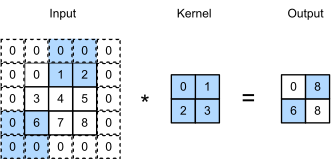
One issue while working with convolutional layers is that some pixels tend to be lost on the perimeter of the original image. Since generally, the filters used are small, the pixels lost per filter might be a few, but this adds up as we apply different convolutional layers, resulting in many pixels lost. The concept of padding is about adding extra pixels to the image while a filter of a CNN is processing it. This is one solution to help the filter in image processing – by padding the image with zeroes to allow for more space for the kernel to cover the entire image. By adding zero paddings to the filters, the image processing by CNN is much more accurate and exact.
**It** consists of adding an appropriate number of rows and columns on each side of the input feature map so as to make it possible to fit center convolution windows around every input tile. For a 3 × 3 window, you add one column on the right, one column on the left, one row at the top, and one row at the bottom. For a 5 × 5 window, you add two rows.
In `Conv2D` layers, padding is configurable via the `padding` argument, which takes two values: "*valid*", which means no padding (only valid window locations will be used); and "*same*", which means “pad in such a way as to have an output with the same width and height as the input. The padding argument defaults to "valid".
Check the image below – padding has been done by adding additional zeroes at the boundary of the input image. This enables the capture of all the distinct features without losing any pixels.
#### Pooling Layers
1. Max pooling
2. Avg. pooling
3. Global pooling
The pooling layer (POOL) is a down sampling operation, typically applied after a convolution layer, which does some spatial invariance. In particular, max and average pooling are special kinds of pooling where the maximum and average value is taken, respectively.
In max pooling, each pooling operation selects the maximum value of the current view where in avg. pooling each pooling operation averages the values of the current view.
The convolution layer contains filters for which it is important to know the meaning behind its hyperparameters.
1. Dimensions of a filter
2. Stride
3. Zero-padding
#### **STRIDES**
The other factor that can influence output size is the notion of strides. The description of convolution so far has assumed that the center tiles of the convolution windows are all contiguous. But the distance between two successive windows is a parameter of the convolution, called its stride, which defaults to 1. It’s possible to have stride convolutions: convolutions with a stride higher than 1. In below figure**,** you can see the patches extracted by a 3 × 3 convolution with stride 2 over a 5 × 5 input (without padding).

Using stride 2 means the width and height of the feature map are down sampled by a factor of 2. Strided convolutions are rarely used in practice. To down sample feature maps, instead of strides, we tend to use the **max pooling operation.**
**Max pooling**
It consists of extracting windows from the input feature maps and outputting the max value of each channel. It’s conceptually similar to convolution, except that instead of transforming local patches via a learned linear transformation (the convolution kernel), they’re transformed via a hardcoded max tensor operation.
A big difference from convolution is that max pooling is usually done with 2 × 2 windows and stride 2, in order to downsample the feature maps by a factor of 2. On the other hand, convolution is typically done with 3 × 3 windows and no stride.
Additional :
---
# Agent Instructions: Querying This Documentation
If you need additional information that is not directly available in this page, you can query the documentation dynamically by asking a question.
Perform an HTTP GET request on the current page URL with the `ask` query parameter:
```
GET https://59r.gitbook.io/ml-university/deep-learning/cnn.md?ask=
```
The question should be specific, self-contained, and written in natural language.
The response will contain a direct answer to the question and relevant excerpts and sources from the documentation.
Use this mechanism when the answer is not explicitly present in the current page, you need clarification or additional context, or you want to retrieve related documentation sections.